×

Langue

Fermer
Atelier 801
  • Forums
  • Dev Tracker
  • Connexion
    • English Français
      Português do Brasil Español
      Türkçe Polski
      Magyar Română
      العربية Skandinavisk
      Nederlands Deutsch
      Bahasa Indonesia Русский
      中文 Filipino
      Lietuvių kalba 日本語
      Suomi עברית
      Italiano Česky
      Hrvatski Slovensky
      Български Latviešu
      Estonian
  • Langue
  • Forums
  • /
  • Transformice
  • /
  • Modules
  • /
  • [Library] LineGraph-TFM
[Library] LineGraph-TFM
King_seniru
« Censeur »
1566885900000
    • King_seniru#5890
    • Profil
    • Derniers messages
    • Tribu
#1
  6
  • Intro
  • How to use
  • Contributions

http://icons.iconarchive.com/icons/papirus-team/papirus-apps/48/github-icon.png


https://github.com/Seniru/LineGraph-TFM/blob/master/linechart-white.png?raw=true

Light, reusable and customizable charts for Transformice!


https://camo.githubusercontent.com/4e5709e9a6be966afd97c2573b36e3adeece744e/68747470733a2f2f696d672e736869656c64732e696f2f6769746875622f762f7461672f53656e6972752f4c696e6547726170682d54464d3f736f72743d73656d766572 https://camo.githubusercontent.com/5accfd193468f1ae11f72c104809e8e3125646e2/68747470733a2f2f696d672e736869656c64732e696f2f62616467652f616c6c5f636f6e7472696275746f72732d312d6f72616e67652e7376673f7374796c653d666c61742d737175617265 https://camo.githubusercontent.com/2f10856dd1f0ca32b233490df23fdc99faf465f6/68747470733a2f2f696d672e736869656c64732e696f2f6769746875622f6c616e6775616765732f636f64652d73697a652f53656e6972752f4c696e6547726170682d54464d https://camo.githubusercontent.com/3ccf4c50a1576b0dd30b286717451fa56b783512/68747470733a2f2f696d672e736869656c64732e696f2f62616467652f4c6963656e73652d4d49542d79656c6c6f772e737667


Features
  • Customizable components
  • Real time
  • Class based
  • Easy to learn and use


What's new! (v1.0-beta)
  • Now you can add grids to your chart
  • Now you can add data points with beautiful data labels to your chart

  • Move to the release log


    Usage

    Usage is very simple, just include the library [Minfied] in the top of the file and start developing!

    Code Lua

    1
    2
    3
    4
    5
    6
    7
    8
    9
    10
    11
    12
    13
    14
    --insert the library code before the script
    --then call LineChart.init()
    LineChart.init()
    --then call LineChart(id, x, y, w, h) to create a new chart
    chart = LineChart(1, 200, 50, 400, 200)
    --create a new series to insert into the created chart.
    series1 = Series({1,2,3}, {1,2,3}, "series1")
    --add it to the chart
    chart:addSeries(series1)
    --set the labels to display (optional)
    chart:showLabels()
    --display the chart
    chart:show()
    -- this should show a linear chart ...

    Check the documentation for the API and more!


    Demos

    y = x * x (or x^2)

    Code Lua

    1
    2
    3
    4
    5
    6
    7
    8
    9
    LineChart.init() --initializing

    x = range(-5, 5, 0.5)
    y = map(x, function(x) return 2 * x * x end)

    chart = LineChart(1, 200, 50, 400, 200) --instantiation
    chart:addSeries(Series(x, y, "y = 2x^2", 0xCC89FF)) --adds a new series with color purple
    chart:setGraphColor(0xFFFFFF, 0xFFFFFF) --sets graph color to white
    chart:show() --display the chart


    https://camo.githubusercontent.com/c8f39fad5593687588eb0927fbfb9e5ce7c531a6/68747470733a2f2f692e696d6775722e636f6d2f54756c435939572e706e67


    Real time graphs! y = sin(x) * x * x * tanh(x)

    Code Lua

    1
    2
    3
    4
    5
    6
    7
    8
    9
    10
    11
    12
    13
    14
    15
    16
    LineChart.init()

    chart = LineChart(1, 200, 50, 400, 200) --instantiation
    series1 = Series({0}, {0}, "Real time", 0xDD32CC) --creates a new series
    chart:setGraphColor(0xFFFFFF, 0xFFFFFF) --sets graph color to white
    chart:addSeries(series1) --adds the new series

    currX = 0
    --the real time mageic is here!
    function eventLoop(l, r)
    local x = range(currX, currX + 10, 0.1) --creates the x coordinates
    local y = map(x, function(x) return math.sin(x) * x * x * math.tanh(x) end ) --maps x values to the specified function
    series1:setData(x, y) --set new data to the series
    chart:show() --displays it
    currX = currX + 0.5 --this cause x coordinate to move by 0.5 every 500ms
    end


    https://camo.githubusercontent.com/40ad06221f99ad6ced45e490eef25aab3f991bd6/68747470733a2f2f6d656469612e67697068792e636f6d2f6d656469612f5a62537434663470333279553065737439532f67697068792e676966


    Multi-Series Graphs (introducing)

    Code Lua

    1
    2
    3
    4
    5
    6
    7
    8
    9
    10
    11
    12
    13
    14
    15
    16
    17
    LineChart.init()

    chart = LineChart(1, 200, 50, 400, 200) --creates the chart (container for the series)
    chart:setGraphColor(0xFFFFFF, 0xFFFFFF) --sets graph color to white
    xData = range(0, 20, 1) --creates a list of numbers from 0 to 20

    series1 = Series(xData, xData, "linear") --creates a linear series
    series2 = Series(xData, map(xData, function(x) return math.cos(x) end), "y = cos x") --creates a series which maps 'y' values to the 'tan x' value
    series3 = Series(xData, map(xData, function(x) return math.random(x) end), "random") --creates a series which maps 'y' values randomly to 'x'

    --add all the series
    chart:addSeries(series1)
    chart:addSeries(series2)
    chart:addSeries(series3)

    chart:showLabels() --show the labels
    chart:show() --show the plots!


    https://camo.githubusercontent.com/4ee0c28a5f9b330d194438d2ec700796456744cb/68747470733a2f2f692e6962622e636f2f463777367346702f4361707433327572652e706e67


    https://img.shields.io/github/followers/Seniru?label=Follow&style=social https://img.shields.io/github/stars/Seniru/LineGraph-TFM?style=social https://img.shields.io/github/forks/Seniru/LineGraph-TFM?label=Fork&style=social https://img.shields.io/github/watchers/Seniru/LineGraph-TFM?label=Watch&style=social


    Ready to contribute this awesome project?


    • Found something that could make this project better?
    • Found a bug? | Watch or create a new issue |
    • Like to spread the message to the world?
    • Or any kind of contribution?


    Great! Then this is the place for you.
    Just head on to our Github repository to make your most valuable contribution to us!!! :)


    If your contribution is not code related or a bug report, don't worry! Still there are many ways you can help this! Just DM me to know more.


    Dernière modification le 1650003360000
    Overforyou
    « Citoyen »
    1566889980000
      • Overforyou#9290
      • Profil
      • Derniers messages
      • Tribu
    #2
      4
    I find this topic very useful and thank you for sharing your knowledge with us ^-^
    King_seniru
    « Censeur »
    1568200920000
      • King_seniru#5890
      • Profil
      • Derniers messages
      • Tribu
    #3
      1
    Overforyou a dit :
    I find this topic very useful and thank you for sharing your knowledge with us ^-^

    Thanks overforyou!
    King_seniru
    « Censeur »
    1569051300000
      • King_seniru#5890
      • Profil
      • Derniers messages
      • Tribu
    #4
      1

    New Release!


    • Now you can add more than one series into the graph with the help of Series
    • Minor fixes
    King_seniru
    « Censeur »
    1571565780000
      • King_seniru#5890
      • Profil
      • Derniers messages
      • Tribu
    #5
      3

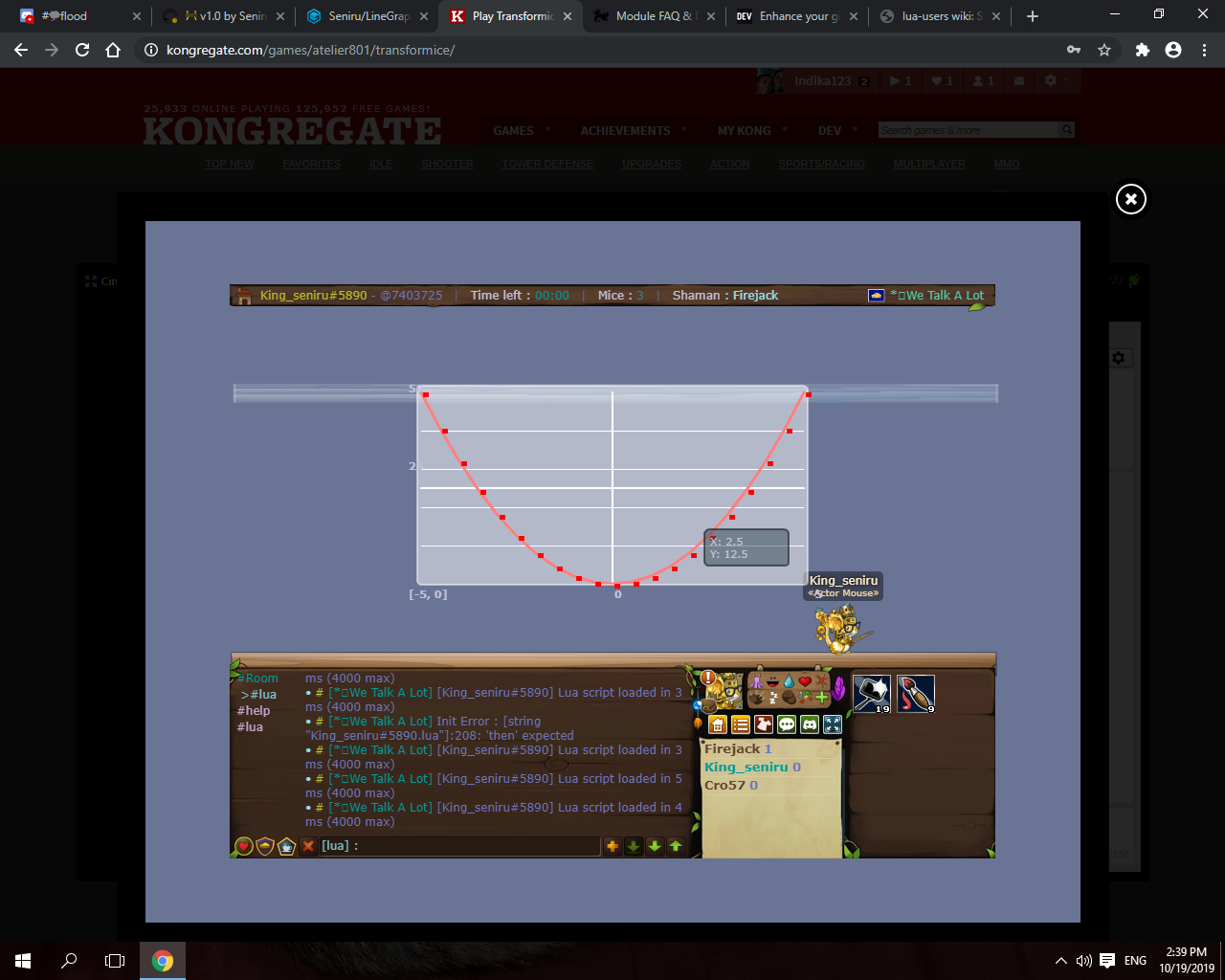
    New Release! v1.0 (beta)


    What's new

    • Add grid system to your chart
    • Add data points to your chart
    • Add labels to your data points


    https://user-images.githubusercontent.com/34127015/67141148-51948600-f27e-11e9-9f25-75aeee25756c.png


    Github source

    • Forums
    • /
    • Transformice
    • /
    • Modules
    • /
    • [Library] LineGraph-TFM
    © Atelier801 2018

    Equipe Conditions Générales d'Utilisation Politique de Confidentialité Contact

    Version 1.27